How to Add a New Interface Language
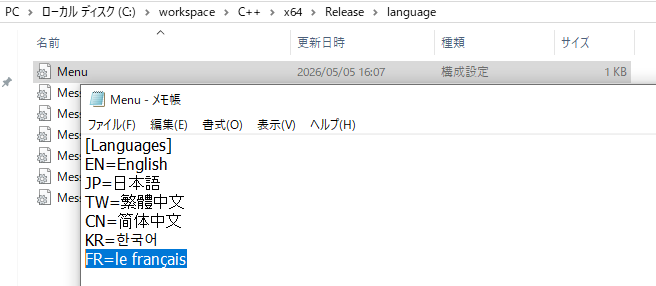
1,Edit the Menu Configuration: Open the Menu.ini file in the language directory and add a line for your custom language.
Example: FR=French
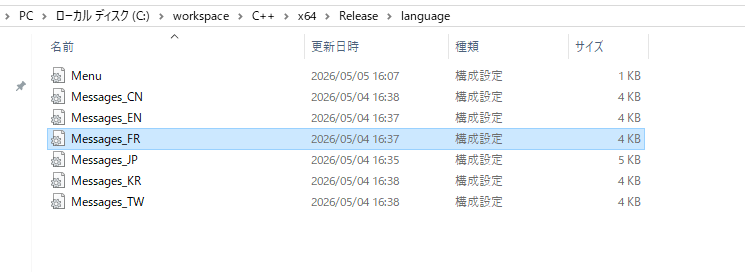
2,Create and Translate the Messages File: Create a copy of the Messages_EN.ini file and rename it to Messages_FR.ini. Translate the English text within the new file into French and save your changes.
Tip: For convenience, you can upload Messages_FR.ini to Google Gemini, and it will handle the translation for you.
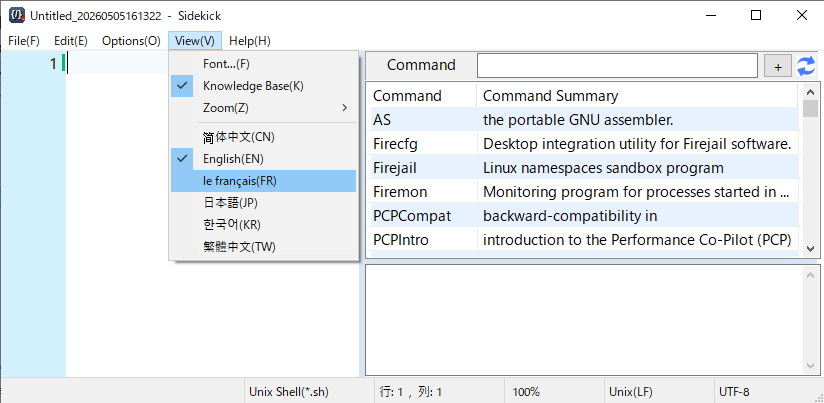
3,Apply the Changes: Restart Sidekich.exe. You can now select "French" from the "View" menu to switch to the new language.
1,Edit the Menu Configuration: Open the Menu.ini file in the language directory and add a line for your custom language.
Example: FR=French
2,Create and Translate the Messages File: Create a copy of the Messages_EN.ini file and rename it to Messages_FR.ini. Translate the English text within the new file into French and save your changes.
Tip: For convenience, you can upload Messages_FR.ini to Google Gemini, and it will handle the translation for you.
3,Apply the Changes: Restart Sidekich.exe. You can now select "French" from the "View" menu to switch to the new language.